
Zengo: Crypto & Bitcoin Wallet
ZenGoFinance
4.1598.00 Reviews
- Version
- 9.6.3
- Installs
- 1.00M
- Age Rating
- Everyone
Screenshots

Our Review of Zengo: Crypto & Bitcoin Wallet
 Analysis by Appyee
When I want to check a crypto balance or make a straightforward transaction, I value a wallet that doesn’t make me wrestle with technical details before I can get started. Zengo: Crypto & Bitcoin Wallet is built around that kind of approachable experience: it’s a finance app from ZenGo for keeping and trading digital assets, with a setup that feels aimed at ordinary users rather than people who already know every wallet term. That convenience is appealing, but I’d still treat any crypto wallet as a tool that needs careful use, not as a shortcut to safer investing.
The app is free to download, rated for Everyone, and has passed one million installs. It holds an average rating of 4.1 from around ten thousand ratings, with hundreds of written reviews. Those figures suggest that plenty of people have tried it, but they can’t tell me whether its approach suits your habits. I’d judge it by the practical questions: how comfortable you are with its recovery model, whether you want to buy and trade in the same place you store crypto, and how much control you expect from a wallet.
What the current version says—and what it doesn’t
The current version is 9.6.0, and the app first appeared in January 2020. That gives it a meaningful stretch of time in which to become an established product, but a version number alone is not a feature-by-feature history. I can describe what the app presents now, but I wouldn’t assume that every screen or process has stayed the same for existing users. The useful point is that ZenGo continues to maintain a current wallet app, while the practical experience should be assessed from the setup and account options you see on your own device.
For someone already using it, a new version is worth treating as a reason to review access and recovery details, not as proof that your holdings or security arrangements have changed. I’d make sure I can still get into the account, understand how recovery works, and recognise the steps required before approving a transaction. That small check is more useful than reading a version number as a promise of new capabilities.
First Impressions: Setting Up
Right off the bat, Zengo stands out with its sleek and user-friendly interface. Setting up the wallet was super straightforward, which is a big plus for someone like me who isn’t exactly a crypto whiz. The app guides you through the setup process with easy-to-follow steps, making it accessible even for beginners.
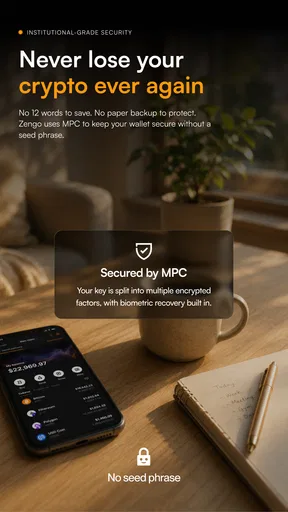
I was particularly impressed with the emphasis on security. Instead of the usual seed phrase, Zengo uses a facial recognition system. At first, I was a bit skeptical—who wouldn’t be? But after using it, I actually found it quite reassuring. No more worrying about losing a piece of paper with your life savings on it!
Features That Stand Out
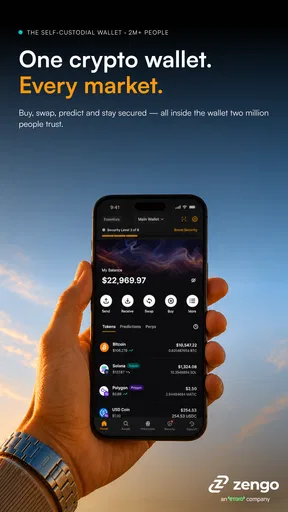
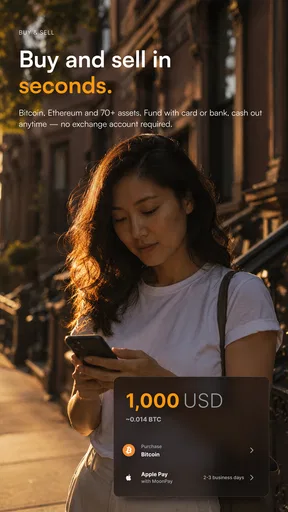
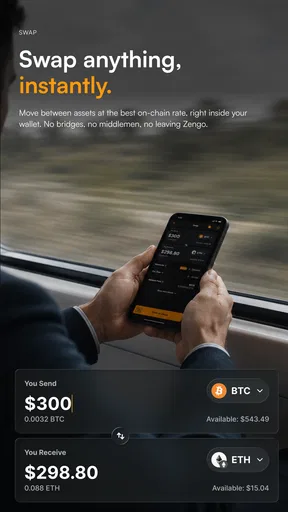
Once you're in, the app offers a bunch of cool features. It supports a range of cryptocurrencies like Bitcoin, Ethereum, and others, which is perfect if you’re looking to diversify your portfolio. Plus, Zengo makes it super easy to buy, sell, and trade within the app. The whole process feels seamless, and transactions are a breeze.
One feature I really enjoyed was the savings plan option. You can set aside some coins for the long haul, which is great if you’re thinking about the future. It’s like setting a financial goal, and Zengo helps you stick to it.
Security: A Breath of Fresh Air
We’ve got to talk about security, because let’s face it, it’s a big deal when it comes to crypto. Zengo’s facial recognition technology is genuinely impressive. It feels like something out of a sci-fi movie! And the app doesn’t store your biometric data, which is a relief. Instead, it uses advanced cryptographic techniques to ensure your assets are safe.
Additionally, Zengo offers a recovery kit, which is a lifesaver if you ever lose access to your account. It’s a little extra peace of mind in a world where security breaches seem all too common.
Security habits that matter in practice
Even with an easier recovery approach, I wouldn’t treat setup as a one-time chore. I’d complete the recovery steps while I’m calm, then make sure I understand where the recovery kit is kept and how I would use it if my phone were lost or replaced. A recovery method only helps if I can actually reach it when needed. I’d also avoid storing access instructions in the same place as the device itself, since that defeats the point of planning for a lost phone.
Face recognition can make access feel familiar, but it doesn’t make a transaction harmless. I’d slow down before confirming a transfer, check the destination carefully, and keep a small test transfer in mind when sending to an address I haven’t used before. That extra pause is especially useful when a wallet makes buying or trading feel quick; convenience can otherwise encourage tapping through a decision that deserves attention.
Everyday Use and Support
Using Zengo on a daily basis is pretty smooth. The app loads quickly, and navigating between different sections is intuitive. I’ve had no issues with lag or crashes, which is always a bonus.
Customer support is another area where Zengo shines. They have a helpful and responsive team, and their in-app chat feature means you can get assistance without leaving the app. It’s those little things that make a big difference, especially if you ever find yourself in a pinch.
A realistic routine, not constant trading
For an everyday example, imagine setting aside a little time after payday to review what you already hold, decide whether you’re adding anything, and then close the app rather than checking prices every hour. The savings-plan option can suit that deliberate routine better than frequent trades. I’d decide on an amount I can afford to leave exposed to crypto, make the purchase only after checking the details, and keep ordinary bills and emergency savings separate from wallet funds.
If I were using the app while travelling or between errands, I’d avoid making a large transfer on a rushed connection or when distracted. A wallet that puts several actions in one place can save time, but it also concentrates important decisions in a phone interface. I’d use it for a planned task, not as an excuse to make an impulsive trade whenever a notification or market move catches my eye.
Where it fits among wallet alternatives
Compared with a basic wallet focused mainly on holding assets, Zengo’s appeal is that buying, selling, and trading sit alongside storage, so a newcomer can handle several routine tasks without jumping between services. That can make the first steps feel less fragmented. The trade-off is that an all-in-one flow may be less attractive to someone who wants to separate long-term storage from an account used for frequent transactions.
People who prioritise direct control over keys, a particular network, or a highly specialised trading workflow should compare the exact options before moving funds. A hardware wallet may suit someone who values keeping long-term holdings away from a phone-based routine, while an exchange app may be more familiar to someone whose priority is active market trading. Those alternatives involve different trade-offs; I wouldn’t choose one just because it sounds more advanced. I’d choose based on how I plan to use and protect the assets.
Who Would Love Zengo?
If you’re someone who’s new to the crypto world or just wants an easy and secure way to manage your assets, Zengo is definitely worth checking out. Its focus on security and user experience makes it stand out from the crowd.
Even if you're a seasoned trader, the app’s simplicity and reliability might win you over. Plus, with its diverse range of supported currencies, you can manage all your digital assets in one place.
I’d be more cautious about recommending it to someone who needs a particular coin or network and hasn’t checked that it is supported for their intended use. I’d also point away from it if the person expects crypto to behave like a savings account, wants to avoid price swings altogether, or dislikes managing account access through a mobile app. Before making a first purchase, I’d check the available asset and transaction details on screen, and make sure the total cost fits my plan rather than focusing only on the amount of crypto received.
Costs, compatibility, and sensible expectations
Although downloading the app is free, in-app purchases are listed from $19.99 to $129.99 per item. I’d check what a particular purchase or service costs at the point of use instead of assuming every action is free because the app itself costs nothing. Crypto transaction costs and the amount received can depend on the transaction details, so I’d review the confirmation screen carefully before approving anything. The minimum operating-system requirement is Android 8.0, which is useful to check if you’re setting it up on an older phone.
A common question is whether the wallet is suitable for a complete beginner. I think it can be, especially for someone who wants a guided start and is willing to learn basic safety habits. A different question is whether it removes the risk of losing money: it does not. The wallet can help manage access, but crypto prices can change sharply, and no interface can make an unsuitable investment sensible.
Another practical question is whether to move every holding into one app. I wouldn’t do that automatically. I’d first test the workflow with an amount I’m comfortable handling, confirm I can complete recovery, and learn how the asset and network choices work. If my needs later become more specialised, I’d compare other storage methods before transferring a larger balance. Keeping a clear record of what I own and where I hold it also makes account recovery and personal budgeting easier.
What I’d keep an eye on
As ZenGo continues to maintain the app, I’d watch for changes that affect recovery, supported assets, and the steps or costs shown before a transaction. Those are the details that can alter a wallet’s fit for an existing user more than a refreshed appearance. I’d review release notes when available and check the relevant screens after an update, especially before relying on the app for a time-sensitive transfer. That’s a practical habit, not a reason to expect a particular feature or change.
My overall view is that Zengo is most compelling when I want a relatively approachable place to manage routine crypto tasks and I’m comfortable learning its recovery process. Its facial-recognition-led access and recovery kit give it a different feel from a wallet built around keeping a handwritten seed phrase, while the built-in buying and trading make it more convenient than a storage-only tool. I’d still compare costs and supported assets, keep recovery information safe, and avoid putting money into crypto that I can’t afford to lose.
Who Would Love Zengo?
If you’re someone who’s new to the crypto world or just wants an easy and secure way to manage your assets, Zengo is definitely worth checking out. Its focus on security and user experience makes it stand out from the crowd.
Even if you're a seasoned trader, the app’s simplicity and reliability might win you over. Plus, with its diverse range of supported currencies, you can manage all your digital assets in one place.
Overall, Zengo: Crypto & Bitcoin Wallet offers a refreshing take on digital currency management. Its blend of cutting-edge technology and user-friendly design makes it a fantastic choice for anyone looking to dive into the world of crypto. Give it a try, and let me know what you think!
Verdict
Strengths of Zengo: Crypto & Bitcoin Wallet
- User-friendly interface for all levels.
- Supports multiple cryptocurrencies seamlessly.
- Robust security with multi-factor authentication.
- Quick and easy setup process.
- Real-time transaction notifications.
Limitations of Zengo: Crypto & Bitcoin Wallet
- Limited customer support options.
- No option for hardware wallet integration.
- Some features require premium subscription.
- Not available in all countries.
- Lacks advanced trading tools.
Similar Picks in This Category
View All
Google Wallet
Google LLC4.3

Airtel: Recharge, Bank & Loans
Airtel4.0

PayPal - Pay, Send, Save
PayPal Mobile4.2

DANA Indonesia Digital Wallet
PT Espay Debit Indonesia Koe4.5

Binance: Buy Bitcoin & Crypto
Binance Inc.4.8

Cash App
Block, Inc.4.7
Frequently Asked Questions
What is Zengo and how does it work?
Zengo is a crypto and Bitcoin wallet that offers a secure and user-friendly way to manage your digital assets. Unlike traditional wallets, Zengo uses keyless security technology, eliminating the risk of losing your private keys. It leverages advanced biometric encryption so you can access your funds simply by using facial recognition.
Is Zengo safe for storing cryptocurrencies?
Yes, Zengo is designed with security as its top priority. It employs a unique keyless security model that protects your assets without the need for private keys. The use of biometric authentication adds an additional layer of security, making it safe for storing various cryptocurrencies, including Bitcoin and Ethereum.
Can I buy and sell cryptocurrencies directly in Zengo?
Absolutely. Zengo allows you to buy and sell a variety of cryptocurrencies directly within the app. It partners with leading crypto exchanges to provide competitive rates and a seamless transaction experience. You can also track market trends and manage your portfolio all in one place.
What fees are associated with using Zengo?
Zengo charges transaction fees when buying or selling cryptocurrencies, which vary depending on the payment method and market conditions. There are no hidden fees for storing your assets or for using the app's basic features. It's recommended to check the app for the most current fee structure before making transactions.
Is Zengo available on both Android and iOS devices?
Yes, Zengo is available for download on both Android and iOS platforms. The app is designed to provide a seamless experience regardless of the operating system. You can find the app on Google Play Store for Android devices and the Apple App Store for iOS devices, ensuring accessibility for all users.
